
With Markdown we can add images to our articles following easily, following this syntax.
<p>
  <img src="./folder/image.avif" alt="Description" title="Title" />
</p>
The image is wrapped by a paragraph because the Markdown parser differentiates between inline and block elements. Block elements has no etra
p; inline ones has.
We can’t generate custom markup. There’s no way to use the figure tag, which
is very useful to add a caption to the image or video. Plus, it’s a common and
an extended practice to indicate or highlight who signs the image or adding
additional information the image doesn’t show.
<figure>
  <img src="./folder/image.avif" alt="Description" title="Title" />
  <figcaption>Author: Mamutlove — 2026</figcaption>
</figure>
Options
Depending on your stack, you could choose between these options:
Caption look like
Markdown processes the tags that recognizes
https://www.markdownguide.org/cheat-sheet/ and figure is not one
of them. Instead, you can add a text next to the image and use CSS to sytle it
as it was a caption. Visually speaking, the results is good but it is not at a
structural level. There’s not a relation between both elements and the
accessibility tree doesn’t reflect what you are trying to express.
HTML in MDX
If you are using MDX you can embed HTML directly. This is a good solution. Expressive, idiomatic. It’s pretty straight forward but you will realise you could do it better after repeting twice the snippet.
Some content here bla, bla bla...

<figure>
  <img src="./folder/image.avif" alt="Description" title="Title" />
  <figcaption>Author: Mamutlove — 2026</figcaption>
</figure>

More content here as well...
Astro. It’s a trap!
If you’ve used Astro before, you are probably thinking that creating a reusable
component is a nice solution. If you pass-in the component to Content you
won’t have to import it whenever you’ll going to use it, splitting the content
from the form.
---
import { render } from 'astro:content';
import Figure from '@components/Figure.astro';

const { post } = Astro.props;
const { Content } = await render(post);
---

<Content components={{ Figure }} />
But there are a couple of drawbacks. Which shape should the component have?
Astro lets you use Image or img. Image is great when you need control over
the image; different sizes, crop it or get alternative formats. img is enough
if you have a well define size for your image and it’s well optimise, which is
our case.
The trap is that img expects a string (filepath) but Image expects an object
(ImageMetadata) so it’s a great question which element should I choose for
your implementation.
<figure class="root">
  <!-- srcForImage expects ImageMetadata -->
  <image src="{srcForImage}" />
  <!-- srcForImg expects string -->
  <img src="{srcForImg}" />
  <figcaption class="caption">{caption}</figcaption>
</figure>
To use Image you should import the image in the content before. This implies
that you’ll be handling in a different way images that need a caption from those
that it doesn’t need it, and this is weird. This rule is artificial and it’s not
declared anywhere because it’s a different mental model. It binds us to
rememeber a new rule: “if the image needs a caption, the pipeline is different”.
And the conventions that depends on your memory break easily.
import imageWithCaption from './folder/image-with-caption.png';
# Title H1
Some content here bla, bla bla...

More content here as well...
<Figure src={imageWithCaption} caption="Image WITH caption" />
Finally mooore content here...The problem with img is that the prop that points to the resource lands as a
raw string so the path is not processed resulting in a not existing resource and
the image is not rendered.
Workarounds?
I prefer only one mechanism to add images to our content so I don’t want to
import each image in the file, this is why I go with the img for the
component. I like to pass to the component the image with the path already
resolved and ready to be rendered, using Figure as a wrapper for a slot.
---
interface Props {
  caption: string;
}

const { caption } = Astro.props;
---

<figure>
  <slot />
  <figcaption>{caption}</figcaption>
</figure>
<Figure caption="Author: Mamutlove — 2026">

</Figure>In my opinion, this approach improves DX so you don’t have to worry about imports. Images will always be added using the pretty neat Markdown syntax. Humblebly, articles should be easy to edit. Always.
The output is <p><img .../></p> because img is an inline element, and I
agree that is not the classic markup we are used to see. However, it’s not
invalid neither. On the other hand, we are winning a pair of use cases we did
not have in mind but are useful.
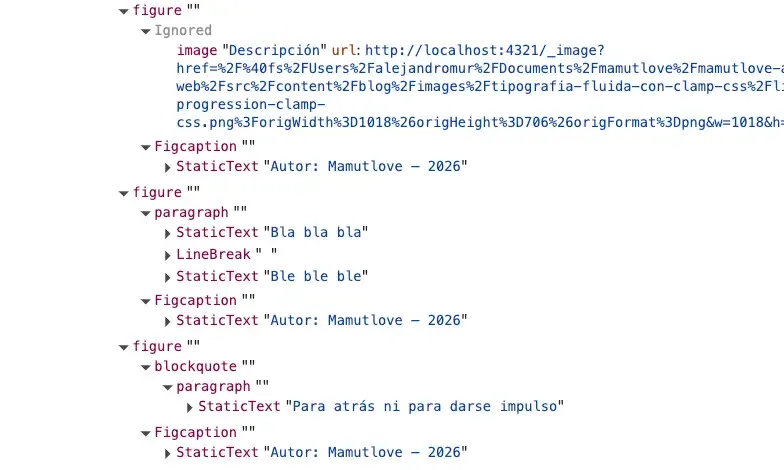
<Figure caption="Author: Mamutlove — 2026">
  Bla bla bla\
  Ble ble ble
</Figure>

<Figure caption="Author: Mamutlove — 2026">
  > Never go backwards
</Figure>
The accessibility tree is correct, so there are no cons.
Anyway, if you don’t like the markup you can unwrap it.
---
interface Props {
  caption: string;
}

const { caption } = Astro.props;

const slotted = await Astro.slots.render('default');
const media = slotted.replace(/^\s*<p>([\s\S]*?)<\/p>\s*$/, '$1').trim();
---

<figure>
  <Fragment set:html={media} />
  <figcaption>{caption}</figcaption>
</figure>
Caption Beyond its limits
What will happend next is that someone will encounter the need to add bold or cursive format in the caption but since the attribute is not parsed by Markdown we can’t do it.
A right of light enters the room. We can modify it adding a second slot for
both accept the attribute or a Fragment. Tada!
---
interface Props {
  caption?: string;
}

const { caption } = Astro.props;
const hasCaption = Boolean(caption) || Astro.slots.has('caption');
---

<figure class="root">
  <slot />
  {
    hasCaption && (
      <figcaption class="caption">
        <slot name="caption">{caption}</slot>
      </figcaption>
    )
  }
</figure>
<Figure caption="Author: Mamutlove — 2026">

</Figure>
<Figure>

<Fragment slot="caption">
Author: *Mamutlove* — 2026
</Fragment>
</Figure>This solution is interesting because Fragment doesn’t genereate a new node.
It’s true that the content of the sencond slot will be wrapped within a p
but figcaption accepts any flow content, so it’s valid anyway.
Resources
- Markdown Cheatsheet
- MDN — Figure
- Astro — Images